
Magic Box IP Subnetting
So, during a random discussion whilst I played Call of Duty: Black Ops, it was about IP subnetting and the CCNA test. So IP subnetting, basic base-2 math, is actually very simple to accomplish. The tough part is trying to QUICKLY attain this information while testing.
I was taken aback when I was asked how I did this during my 3 CCNA testing methods, and Mike Storm, an instructor at Interface Technical Training in AZ, had an awesome method called the Magic Box. His upbeat training and encouragement were able to take something like IP Subnet Masks and break it down for testing purposes, so that when you get a question about how many hosts you have, you can fairly quickly know which subnet you need to work with.
This post assumes you have a basic understanding of IP Subnetting and how it works. The understanding of what Classless Inter-Domain Routing (CIDR) notation is, what subnet masks are, and the magical line that delineates hosts from networks. With a basic understanding, this magic box (when tested) makes it easier to grasp what is being asked in a concise format. *In most tests, you have about 1 minute, or less, per question, and when you stay on one for 5-10 minutes just trying to decipher some of it, it will throw you for a loop.
Enough of that mumbo jumbo; let’s get to the good stuff. Here is what Mike Storm taught me with the magic box –
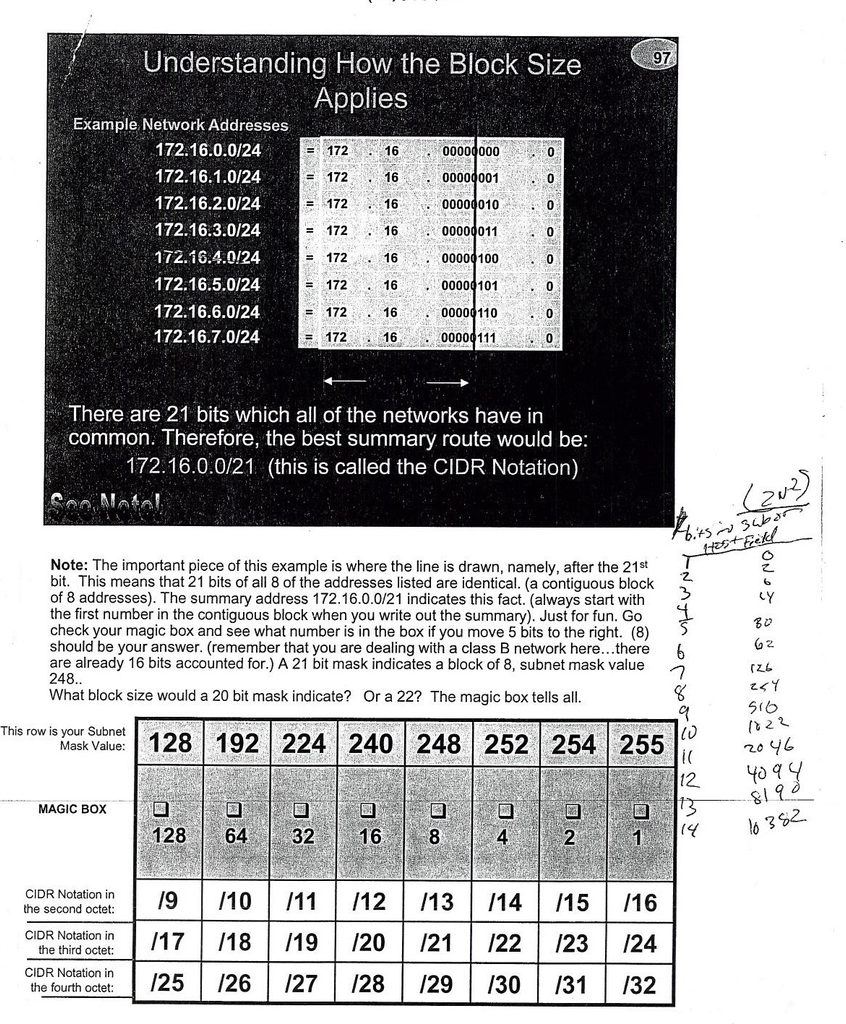
So simple explanation is you essentially just need to KNOW the top row. From the top row you can fill in the rest easily.
- Notice that the top row corresponds with the various subnet masks most commonly utilized.
- 128,192,224,240,248,252,254, or 255. The ”octet” determines the CIDR notation. Meaning, if it is in the Second Octet, it will be a /9 /10 /11 /12 /13 /14 /15 /16, respectively.
- Small side note – These ”slash numbers” e.g., slash 16, equal the number of bits in the subnet mask in use between the network, Subnet, and host. /16 would be – X= number, n= network, and h = host xnnnnnnn.xnnnnnnn.hhhhhhhh.hhhhhhhh in binary. If you are in a Class B subnet, the first two octets are the only ones of concern for network addressing.
- The CIDR notation can then be deciphered, say if you get asked if Network B has a /25 network yet needs 700 hosts what network would support the required number of hosts… quickly (if you wrote this down) you can answer the question. If you aren’t using a quick method, you are figuring it out from scratch, unless you are quick with binary to convert back to decimal to determine which networks and hosts can support such a network.
- With that same question – /25 network and 700 hosts doesnt work. Why? Because you look at what /25 is and look up in the column to see that the network is split into two 128-segment networks, which cannot handle 700 hosts. Most people should realize that a /24 is a 256-node network (0 through 255 = 256), and that after removing the broadcast and network addresses, the total usable nodes are 254.
- ***NOTE the equation 2N-2 to determine actual host count… this removes the broadcast and network addresses from ”usable” range which in turn gives you the actual numbers available.***
- 128,192,224,240,248,252,254, or 255. The ”octet” determines the CIDR notation. Meaning, if it is in the Second Octet, it will be a /9 /10 /11 /12 /13 /14 /15 /16, respectively.
There are a ton of articles about how to subnet/put things down / figure things out, but this magic box (when testing) makes it very simple to quickly remember all the variations. I’ve used it 2 times in the 3 times I have passed my CCNA combined test (one test to get the CCNA), and it helped me save time on a few questions.
Hope you like this, and happy subnetting!!
Comments are closed.